ZITHA SPECIALTYSPECIALTY FIBER CABLES Technical Inquiry

How to connect the fiber optic connector box

To connect a fiber optic box connector, carefully align the fiber cable with the connector type, insert it into the port, and secure it while following proper handling and safety procedures.Step 1: Gather Necessary Equipment

Before starting, ensure you have the following:

  • Fiber optic cable (single-mode or multi-mode, typically with SC/APC, SC/UPC, or LC connectors)
  • Optical Network Terminal (ONT) or fiber-ready router
  • Ethernet cable (for connecting ONT to router)
  • Connector tools: fiber strippers, cleaver, UV glue or epoxy, crimping pliers, and dust caps
  • Safety equipment: gloves and safety glasses to protect against glass shards ( ).
Step 2: Prepare the Fiber Cable
  1. Inspect the fiber for damage; avoid kinks or bends.
  2. Strip the protective coating carefully using fiber strippers.
  3. Cleave the fiber to the correct length using a fiber cleaver.
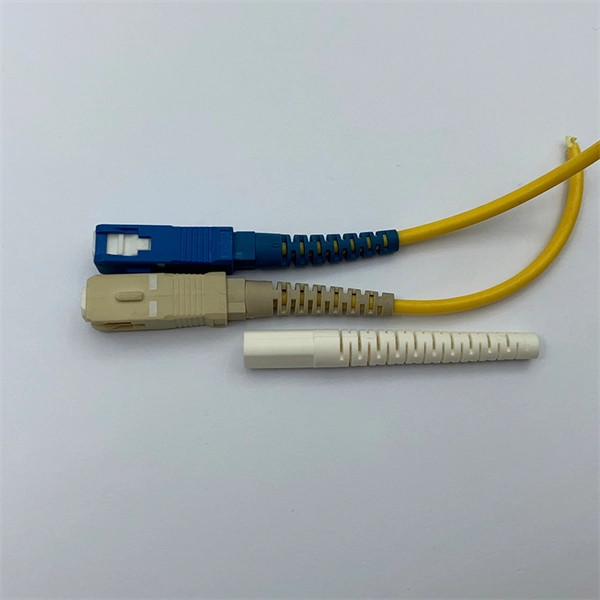
  4. Insert the connector boot and riveting ring onto the fiber ( ).
Step 3: Connect the Fiber to the Connector
  • LC connector: Use the latch mechanism to secure the fiber.
  • SC connector: Push-pull with latch; rotate the boot to secure the fiber in place.
  • FC connector: Threaded screw mechanism; crimp the ferrule and tighten the outer housing.
  • Apply UV glue or epoxy as needed and cure with a UV lamp. Clean the end face and place a dust cap to protect it ( ).
Step 4: Connect to the Fiber Optic Box or ONT
  1. Locate the fiber optic wall outlet or ONT port.
  2. Insert the prepared fiber connector into the corresponding port, ensuring proper alignment. The connector should click or lock into place ( ).
  3. Avoid excessive bending; maintain the minimum bend radius to prevent signal loss.
Step 5: Connect ONT to Router
  • Use an Ethernet cable to link the ONT's LAN port to your router's WAN port.
  • Power on the ONT and router, and wait for the status lights to stabilize, indicating a successful connection ( ).
Step 6: Test and Manage the Connection
  • Verify signal strength using tools like a visual fault locator or Optical Time Domain Reflectometer (OTDR).
  • Secure excess cable with velcro straps or cable managers to prevent tension or loops.
  • Ensure all connectors are properly aligned and locked to maintain stable performance ( ). Following these steps ensures a safe, reliable, and high-performance fiber optic connection for your network.
How to connect the fiber optic connector box

All You Need To Know About Fiber Termination Boxes: Installation

Types of Fiber Optic CablesWhat Is A Fiber Termination Box?Fiber Termination Box Installation ProcedureMaintenance of Fiber Termination BoxIn network cabling, outdoor connections generally use fiber optic cables. When these optical fibers are installed or laid out, a Fiber Termination Box, or FTB, is used to distribute and protect the optical fiber links in FTTH networks. The fibertermination box is an interface between the fiber cable from the line side andthe pigtails to be passed t...See more on stl.techExplore with imagesFiber Optic Pull BoxAT&T Fiber Optic BoxFiber Optic Junction BoxFiber Optic Wall BoxFiber Optic Splice BoxFiber Optic InstallationFiber Optic Internet BoxFiber Optic Connection DiagramSt Fiber Optic ConnectorFiber Optic SC ConnectorSee allfiberexplained

Fiber Optic Internet Installation Guide: Steps for Installing Fiber

Learn how fiber optic internet installation works, from network planning to internal ONT setup. Discover step-by-step guidance for

Related Video Reference

This video was associated with the source search result. Verify technical details against current product documentation and project requirements.

Technical note

This reference is intended for preliminary specialty-cable research. Compatibility, link budgets, fire performance, installation methods, test limits and applicable standards must be verified for the specific project.

Still Have a Technical Question?

Use the inquiry form to describe a specialty cable route, fire requirement or testing question.

Start an Inquiry