ZITHA SPECIALTYSPECIALTY FIBER CABLES Technical Inquiry

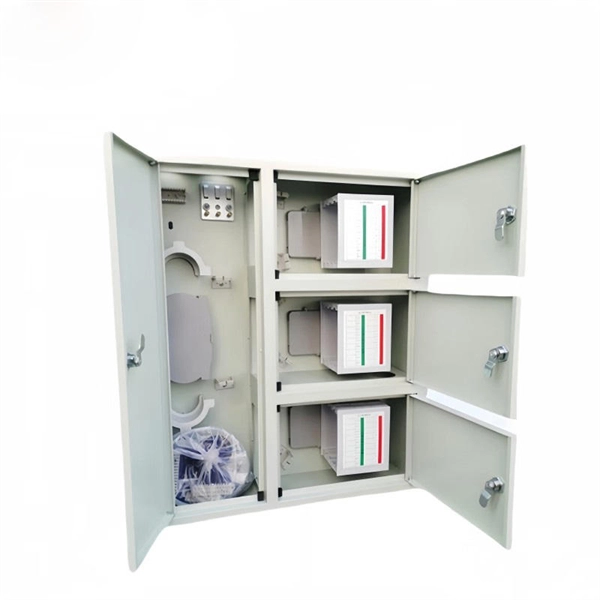
How to connect the fiber optic connection terminal box

Connecting a fiber optic terminal box involves mounting the box, preparing and splicing the fiber cables, routing them properly, labeling, and testing the connections for optimal performance.Step 1: Preparation

Before starting, ensure you have the necessary tools and materials: a fiber optic terminal box, fiber optic cables, fiber adapters, cable cutters and strippers, a fusion splicer, cleaning agents, gloves, and labeling tape. Inspect all cables for damage and lay them flat to facilitate handling .

Step 2: Choose Installation Location

Select a suitable location for the terminal box, typically on a wall or cable rack. Ensure there is at least 20 cm of clearance from the cable exit to allow proper storage and slack management . For outdoor boxes, choose a weather-protected area.

Step 3: Mount the Terminal Box

Secure the box using expansion screws or other appropriate fasteners. Ensure it is stable and level to prevent movement that could stress the fibers . Indoor boxes can be wall-mounted, desktop, or rack-mounted depending on the environment .

Step 4: Connect Fiber Cables
  1. Strip the fiber optic cable to expose the core.
  2. Clean the fiber ends using alcohol or a specialized cleaner.
  3. Insert the fiber into the terminal box interface.
  4. Splice the fiber core to the pigtail inside the box using a fusion splicer. Use the provided cassettes to protect the spliced fibers and store any excess fiber .
  5. Ensure fibers are routed without sharp bends or pinches to prevent signal loss.
Step 5: Install Adapters and Labeling

Insert fiber adapters into the designated ports and ensure they are securely in place. Label each fiber connection clearly to identify its corresponding port or network device, which simplifies future maintenance and troubleshooting .

Step 6: Test the Connection

Use a fiber optic power meter or similar testing tool to verify signal quality and transmission. Check for weak or lost signals and adjust splices or routing as needed. Ensure all connections are stable and fibers do not move when lightly tugged .

Step 7: Maintenance

Schedule regular inspections to clean adapters, check for loose connections, and replace any damaged components. Proper maintenance ensures long-term reliability and optimal network performance . By following these steps carefully, you can ensure a secure, organized, and high-performance fiber optic terminal box installation suitable for both indoor and outdoor environments.

How to connect the fiber optic connection terminal box

All You Need To Know About Fiber Termination Boxes: Installation

Types of Fiber Optic CablesWhat Is A Fiber Termination Box?Fiber Termination Box Installation ProcedureMaintenance of Fiber Termination BoxIn network cabling, outdoor connections generally use fiber optic cables. When these optical fibers are installed or laid out, a Fiber Termination Box, or FTB, is used to distribute and protect the optical fiber links in FTTH networks. The fibertermination box is an interface between the fiber cable from the line side andthe pigtails to be passed t...See more on stl.techExplore with imagesFiber Optic Cable TerminationFiber Optic BoxFiber Optic Terminal BoxOptic Drop Cable Terminal BoxFiber Optic Junction BoxFiber Access Terminal BoxFiber Optic Splice EnclosureFibre Optic Terminal BoxFiber Optic Terminal Box ConvergeFiber Optic Splitter BoxSee allhonelinks

How to Install a Fiber Optic Termination Box (FTTH Steps)

Learn how to install a fiber optic termination box step-by-step for FTTH projects. Covers mounting, splicing, routing, labeling, and

Related Video Reference

This video was associated with the source search result. Verify technical details against current product documentation and project requirements.

Technical note

This reference is intended for preliminary specialty-cable research. Compatibility, link budgets, fire performance, installation methods, test limits and applicable standards must be verified for the specific project.

Still Have a Technical Question?

Use the inquiry form to describe a specialty cable route, fire requirement or testing question.

Start an Inquiry